













If we don’t mention Subway Surfers, no one’s childhood memory is truly complete. That kid in the graffiti hat, the grumpy inspector who could never catch you, and the dog that always lost its shoe. Back then, we competed to see who could run an extra thousand meters on the Facebook leaderboard or who could save up enough coins to buy that cool-looking hoverboard.
Nowadays, we might not have much time to hold our phones and grind for high scores. Phone storage is always critically low, and massive AAA titles take up dozens of gigabytes. But many people don't realize that the Subway Surfers web version feels completely different!
I have to tell you responsibly: The web version and the mobile version are two completely different games! Parkour with a keyboard is an absolute game-changer!
Many veteran players quit because they hit a bottleneck with mobile controls. At high speeds, your finger swipes can’t keep up with your brain, or sweaty hands lead to "missed swipes," forcing you to watch helplessly as your character crashes into a train. That frustration is enough to make you want to smash your phone.

But after trying the web version on NetGameX, I felt like I opened a door to a new world.
1. The Precise Feedback of Physical Keys
The biggest change in the web version is switching from touch swipes to keyboard controls (Arrow Keys ↑↓←→).
You might think it’s no big deal, but once you try it, you’ll realize: The keyboard feedback is insanely precise!
Jumping (↑): The moment you hit the Spacebar or Up arrow, that crisp tactile feedback lets you time your jumps down to the millisecond.
Rapid Lane Changing (← →): Fast left-right swipes on a phone can easily knot up your fingers, but on a keyboard, you can easily pull off lightning-fast "shadow moves."
Real Experience: In my first run on NetGameX, I easily broke the record I’d held on my phone for six months. It wasn't that I got better; my equipment did. This feeling of being "one with the keyboard" is something a touchscreen can never provide.
2. Say Goodbye to Overheating and Battery Anxiety
What’s the worst part of mobile gaming? Your phone turning into a hand warmer or that annoying "10% Battery Remaining" warning popping up.
Playing Subway Surfers on the web, you don't have to worry about any of that. Open the browser, load in 3 seconds, and play as long as you want. Especially for students and office workers, you don't need to download gigabytes of installation files, and it doesn't eat up your computer's RAM. It is the perfect "second-screen" companion.
3. Visuals: Zurich has Never Looked Better
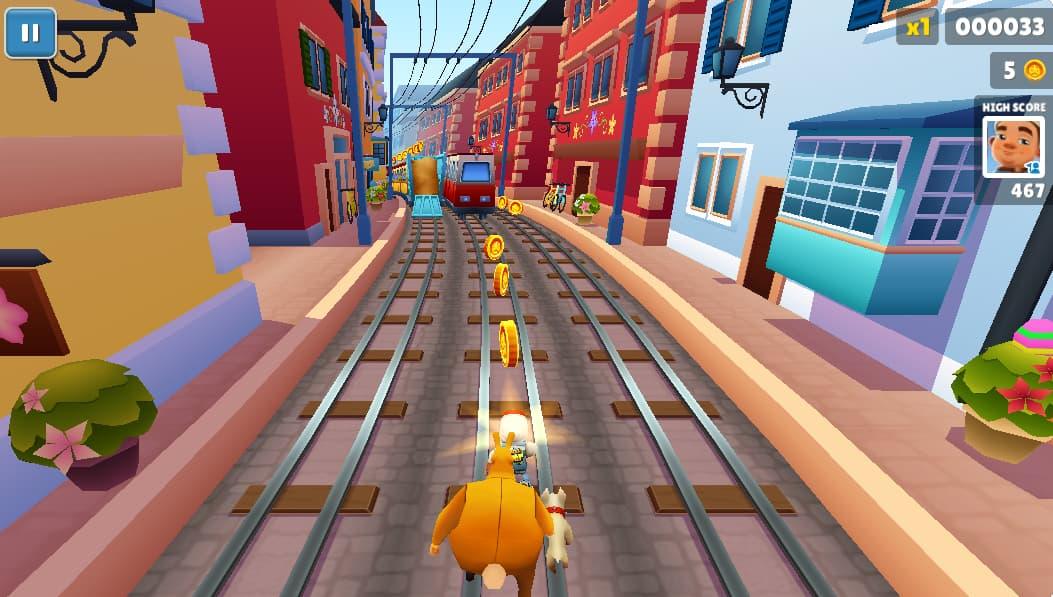
Many people still think H5 web games are stuck in the "pixelated era," but my experience with Subway Surfers on NetGameX completely refreshed my perception.
Currently, NetGameX features the classic Zurich map version.
Big Screen Immersion: Even on a standard 1080P monitor, the detail far exceeds a 6-inch phone screen. When you ride a hoverboard onto the high wires, you can actually see the roof textures of distant European architecture and the clouds drifting in the sky.
Colors & Frame Rate: I specifically checked the fluidity. On Chrome, the game held a stable 60FPS with high color saturation. That colorful graffiti style looks even more impactful on a large screen.
To be honest, on mobile, I was too busy dodging trains to look at the scenery. Now, on the big screen, I realized how much effort the developers put into the background design.
4. Pro Strategies: How to get "God-Tier" Scores on Web
Since the control logic has changed, our tactics need to change too. As a blogger who is already (self-proclaimed) top of the NetGameX charts, here are a few exclusive web-version tips:
"Double Jumping" is Easier: When using a Hoverboard, double-tapping the screen on mobile can sometimes lag. But on the web, you just double-tap the Spacebar (or specific key settings), and it triggers 100% of the time. Use this invincibility frame to plow straight through oncoming trains.
Wider Field of View: Computer monitors usually offer a wider view than phones (depending on window aspect ratio). You can spot coin distributions further away, allowing you to plan your route earlier. I suggest not playing in full screen, but keeping a vertical window ratio, which matches the game's original perspective for maximum focus.
The "Boss Key" Tactic: This is the web version's biggest "cheat code." When you are chasing a high score and suddenly sense danger behind you (Boss/Teacher approaching), just hit Ctrl + Tab to switch tabs, or Alt + Tab to minimize. The game automatically pauses! When you're safe, switch back and continue running with your progress perfectly saved. Doing this on mobile often restarts the app, but it's rock-solid on the web.

In an era where AAA titles bombard our visual nerves, sometimes what we need isn't a massive open world, but just a few minutes of pure, simple joy.
The Subway Surfers web version is exactly that. It doesn't ask you to pay-to-win, grind daily tasks, or deal with complex social pressure.
NetGameX has kept the most authentic game experience—no messy pop-up ads blocking your view, and no forced registration to play.
If you were once that parkour kid, if you miss that summer of running wildly on the tracks, give the web version a try—even if you only have 5 minutes. When that familiar background music hits, and the rhythm of your keyboard clicks syncs with the coin sounds, you'll find that long-lost thrill.
Come on, I’m waiting for you on the leaderboard. Let’s see who runs further: the current you with a keyboard, or the you from ten years ago?
👇 Portal Here (Recommended to open on PC):